Website Redesign SEO Checklist: How to Redesign Without Losing Rankings

Home / SEO / Website Redesign SEO Checklist: How to Redesign Without Losing Rankings

Website Redesign SEO Checklist: How to Redesign Without Losing Rankings

Updated Aug 12, 2026
6 min read
SEO

A website redesign can make your business look more modern, improve navigation, increase speed, and create a better experience for visitors. But there is a risk. A poorly planned redesign can damage organic search visibility.

Important URLs may disappear. Internal links can break. Page content may change. Redirects can be missed. Search engines may suddenly see a very different website.

This website redesign SEO checklist explains what to protect before, during, and after launch.

1. Audit Your Existing Website Before Redesigning It

Do not start by deleting pages. First, understand what is already working. Your existing website may contain URLs that bring traffic, generate leads, rank for valuable keywords, or have strong backlinks.

Create a full inventory of important URLs. For each page, record useful information such as:

Then decide whether each page should be: kept, improved, merged, redirected and removed.

2. Protect Valuable URLs, Content and Keywords

Changing a design does not always require changing URLs. If an existing URL is relevant, clean, established, and performing well, keeping it may reduce unnecessary migration work.

If the new page still offers the same SEO service, there may be no reason to change that URL simply because the design changed.

Check search intent

Make sure redesigned pages still satisfy the searcher’s need. A page ranking for ‘’local SEO services’’ should not become a vague page about digital marketing in general.

Design can change. Search intent should remain aligned with the page’s purpose.

3. Create a URL Map and Set Up Correct Redirects

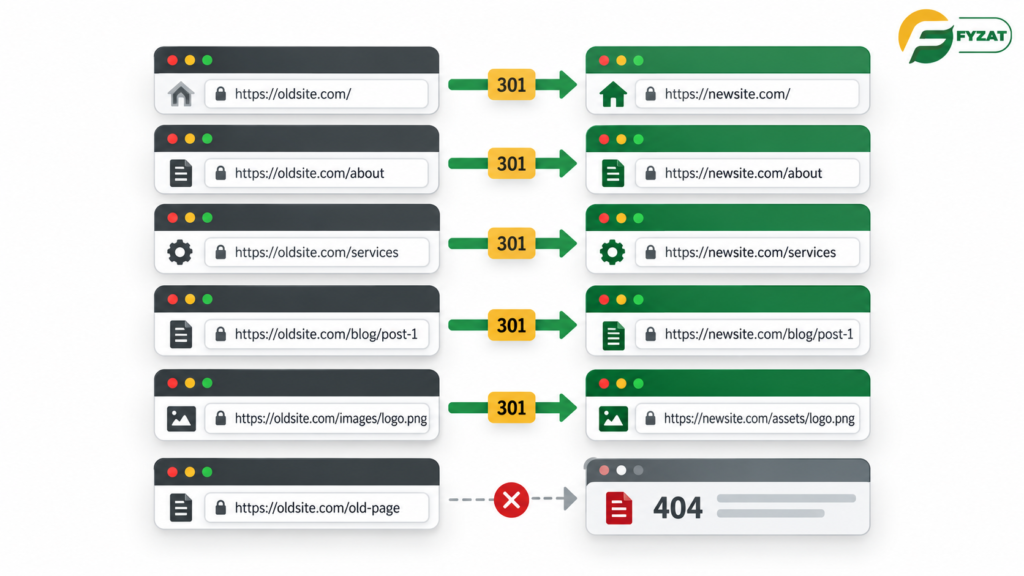
If URLs must change, create a URL mapping document before launch. Every valuable old URL should have a clear destination.

For a permanent URL change, use an appropriate permanent server-side redirect, such as a 301. Google’s site-move guidance states that permanent redirects such as 301 redirects do not cause a loss of PageRank by themselves.

Do not redirect dozens of unrelated deleted pages to your homepage. Redirect an old page to the closest relevant replacement. If no relevant replacement exists, allowing the removed URL to return an appropriate 404 or 410 response may be better than creating an irrelevant redirect.

4. Check Technical SEO Before Launch

Before the new website goes live, perform a full technical review. A staging website may intentionally use noindex or access controls during development. That can be useful.

But those restrictions must not accidentally remain on the live website. You can check:

5. Protect Internal Links, Navigation and Website Structure

Internal links help people and search engines move through your website. During a redesign, menus and page layouts often change. That can accidentally leave important pages buried deep in the site. Keep your structure logical.

For example: Home → Services → SEO Services → Local SEO, it is easier to understand than hiding an important service page behind several unrelated pages.

Update old internal links

If a URL changes, update internal links to point directly to the new URL. Do not rely on redirects for your own navigation.

6. Test, Launch and Monitor the Redesigned Website

SEO work continues after launch. Submit the updated sitemap through Google Search Console. Then monitor the website closely. Some ranking movement can happen after a significant site migration while Google recrawls and reindexes changed URLs.

Do not panic over every small movement. Immediately test the live website with:

Final Thoughts: Redesign the Website, Not Your SEO Success

A website redesign should improve your online presence, not erase years of SEO work. The safest approach is simple: audit first. Protect what works. Map every important change. Test before launch. Monitor after launch.

SEO should be involved from the planning stage, not added after developers finish the new website. That approach gives your business a better chance of keeping existing search value while improving design, usability, and conversions.

Planning a Website Redesign?

Contact Fyzat about an SEO-focused website redesign strategy.

Frequently Asked Questions

Can redesigning a website hurt SEO?

Yes. Rankings can be affected when URLs, content, internal links, indexation settings, or technical elements are changed incorrectly.

Audit your current website first, preserve valuable pages where possible, map changed URLs, implement correct redirects, protect useful content, and monitor Search Console after launch.

Only when there is a good reason. If an existing URL is clean, relevant, and performing well, keeping it can reduce migration complexity.

Google states that 301 and other permanent redirects do not lose PageRank by themselves. They should still point users and search engines to the most relevant replacement page.

Do not delete pages automatically. Review their traffic, rankings, backlinks, content value, and conversions before deciding whether to keep, merge, redirect, or remove them.

Old URLs may return errors, users may reach dead pages, backlinks may stop reaching the intended content, and search engines may need to rediscover the new structure without clear migration signals.

Yes, especially when URLs change. Keep the sitemap focused on the preferred indexable URLs and submit it through Search Console.

There is no universal timeframe. Google notes that a small or medium site move may take a few weeks for most pages to move in its index, while larger migrations can take longer.

SEO should be included before and throughout the redesign. Waiting until after launch can make preventable migration problems harder to fix.

Monitor organic traffic, important rankings, indexing, crawl issues, redirects, conversions, Core Web Vitals, broken links, and important landing pages.

On this page

Is your SEO Strategy Ready for AI?

Get a comprehensive organic search audit from our specialists to identify gaps and growth opportunities.

MD Rakib

WRITTEN BY

MD Rakib

Author at Fyzat. Stay tuned for more informative articles and updates from this author.

Scroll to Top